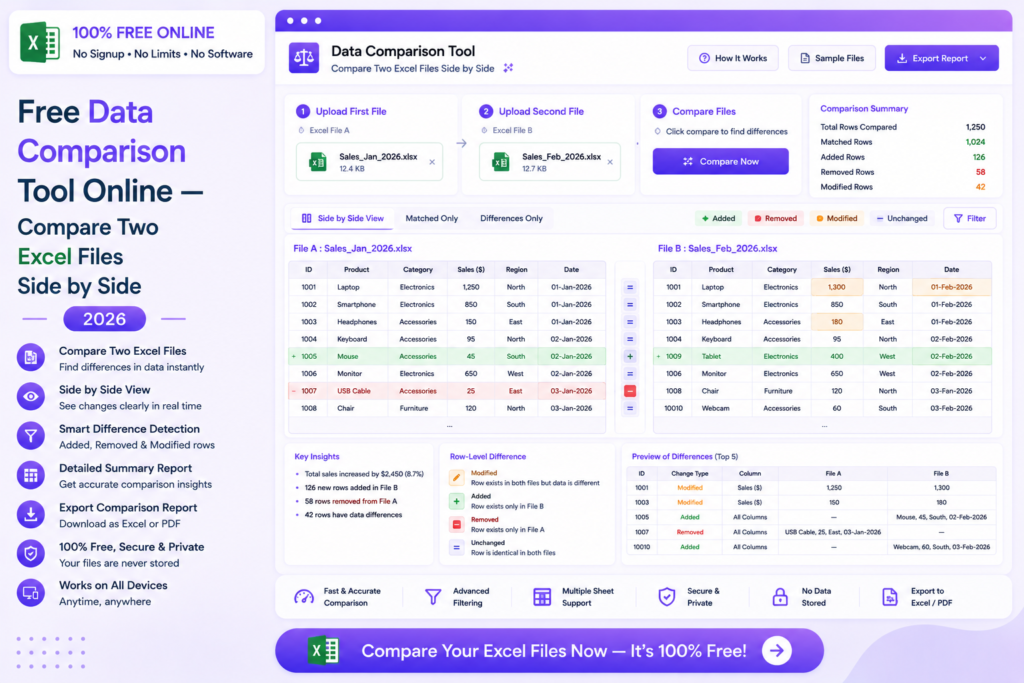
A data comparison free online tool automatically finds differences, changes and mismatches between two Excel or CSV files side by side — saving hours of manual checking.
Free Data Comparison Tool Online — Compare Two Excel Files Side by Side 2026
Upload two Excel or CSV files and instantly find all differences, changes and mismatches automatically — no software, no signup required.
Compare Files Free — Try Now
In This Guide
What is a Data Comparison Tool?
A data comparison tool is an online application that automatically identifies differences between two versions of a data file. It compares both files row by row and column by column — highlighting added rows, deleted rows, changed values and format mismatches instantly.
Manually comparing two large Excel files is time-consuming and error-prone. A single missed difference in a financial report or inventory file can lead to costly mistakes. An automated comparison tool eliminates human error and completes the job in seconds.
MySmartWork’s data comparison free online tool compares two Excel or CSV files automatically and highlights all differences clearly — completely free, no signup, results in seconds.
How to Compare Files Free Online — Step by Step
Upload both files
Open the Data Comparison tool and upload your two Excel or CSV files — the original version and the updated version you want to compare.
Run the comparison
Click Compare and the tool automatically scans both files row by row and column by column, identifying every difference between them.
Review and export results
All differences are highlighted clearly in a side-by-side view. Export the comparison report as Excel or CSV for documentation and review.
Tip: For best results, ensure both files have the same column structure before comparing. Matching headers help the tool align data accurately.
Types of Differences Detected
Added Rows
Rows present in the new file but missing from the original are flagged as additions.
Deleted Rows
Rows present in the original file but removed in the new version are flagged as deletions.
Changed Values
Cells where the value has been modified between the two versions are highlighted clearly.
Moved Rows
Rows that exist in both files but have been repositioned are identified as moved entries.
Format Changes
Changes in number formats, date formats and text case are detected and reported.
Blank Cell Changes
Cells that changed from filled to blank or blank to filled are flagged for review.
Free vs Paid Tools
| Feature | MySmartWork (Free) | Paid Tools |
|---|---|---|
| Cost | Completely Free | Monthly subscription |
| Signup Required | No | Yes |
| Row by Row Comparison | Yes | Yes |
| Export Comparison Report | Yes — Excel, CSV | Yes — Multiple formats |
| Very Large Files | Standard size | Enterprise scale |
| File Privacy | Processed in browser | Uploaded to server |
Common Use Cases
Finance and Accounting
Compare monthly financial reports, bank reconciliation files and budget spreadsheets to identify unauthorized changes, data entry errors or unexplained variances quickly.
Inventory and Supply Chain
Compare inventory snapshots taken at different points in time to identify stock discrepancies, unexpected changes and data entry errors in warehouse management files.
HR and Employee Data
Compare employee databases before and after updates to verify that only authorized changes were made — salary updates, department transfers and new additions.
Software Development and Testing
Compare test result files, configuration exports and data migration outputs to verify accuracy and identify unexpected changes between system versions.
Compliance and Auditing
Auditors use data comparison to verify that financial and operational data has not been altered between reporting periods — an essential step in compliance reviews.
Frequently Asked Questions
Is the data comparison tool really free?
Yes, MySmartWork’s data comparison free online tool is completely free — no hidden charges, no subscription, no signup required.
What file formats are supported?
The tool supports Excel files (.xlsx, .xls) and CSV files (.csv) for comparison.
Can I compare files with different column orders?
For best results, both files should have matching column headers. The tool uses headers to align and compare data accurately across files.
Can I export the comparison results?
Yes, the comparison report can be exported as Excel or CSV — showing all differences clearly with color coding for easy review.
Is my data safe?
Yes. Both files are processed entirely within your browser and are never uploaded to any external server. Your data stays completely private.
Does it work on mobile?
Yes, the tool is fully mobile-friendly and works in any browser on Android and iPhone devices.
Compare Your Files Free — Right Now
No signup. No software. No payment. Upload your two files and find all differences instantly.
Open Data Comparison Tool